How to Fill SRMJEEE Application Form 2027: Step-by-Step Registration Process
Aiming for a B.Tech seat at SRM Institute of Science and Technology (SRMIST)—whether at the flagship Kattankulathur (KTR) campus or its sister campuses across Chennai, Delhi-NCR, and Amaravati—starts with clearing the SRM Joint Engineering Entrance Examination (SRMJEEE). Before you dive into revising Physics formulas or practicing mock tests, your first real checkpoint is submitting an error-free online application.
The good news? SRMIST’s admission portal is clean, intuitive, and even supports fetching your photo and signature directly via DigiLocker. Still, overlooking small rules around aggregate subject percentages, campus preferences, or phase deadlines can cause unnecessary panic. This human-written, verified guide walks you through every single screen of the SRMJEEE 2027 application form from start to finish.
SRMJEEE 2027 Important Dates & Schedule (Phase 1 & Phase 2)
SRMIST has officially opened registrations for SRMJEEE 2027, which will be conducted in two phases via Remote Proctored Online Mode (RPOM). You can apply for Phase 1, Phase 2, or both. Keep these tentative official dates bookmarked:
| Admission Event | Phase 1 Schedule | Phase 2 Schedule |
|---|---|---|
| Registration Start Date | 30 October 2026 (Ongoing) | 30 October 2026 (Ongoing) |
| Last Date to Apply | 02 April 2027 | 04 June 2027 |
| SRMJEEE 2027 Exam Dates | 17 April – 18 April 2027 | 19 June – 20 June 2027 |
| Application Fee | ₹1,400 (Non-refundable) | ₹1,400 (Non-refundable) |
| Official Portal | applications.srmist.edu.in/btech | |
Step-by-Step Guide: How to Fill SRMJEEE 2027 Application Form
The entire application journey unfolds across an initial sign-up followed by a structured 3-stage dashboard (Personal Details, Academic Details, and Payment). Let’s walk through each step in detail.
Step 1: New User Registration & Email Verification
Your first stop is creating an applicant account on SRM’s official admission portal.
- Visit applications.srmist.edu.in/btech and look for the "Admissions Open 2027 – UG Application Form 2027" registration box.
- Enter your full Name, active Email Address, and Mobile Number (+91). Use your own email and phone number since all login links, OTPs, and remote proctoring instructions are sent here.
- Select your State, City, Faculty/College (Engineering & Technology), Degree (B.Tech), and preferred Program.
- Type the security Captcha code, check the authorization consent box, and click APPLY NOW.
- Check your inbox immediately for a verification email from SRMIST and click the activation link to verify your account.
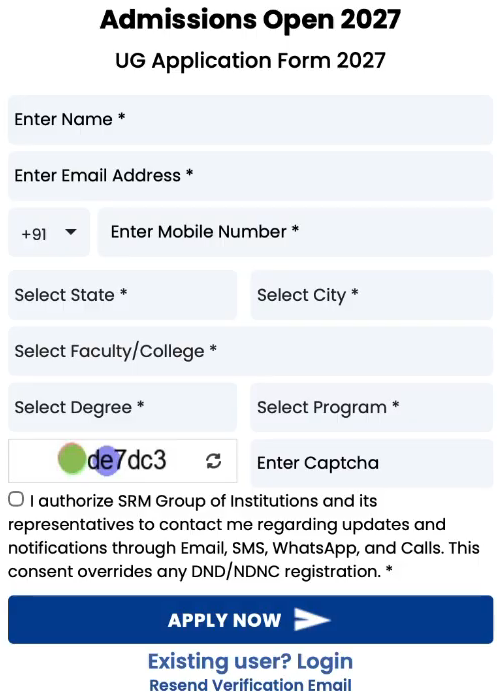
Step 1: Initial UG Application Form 2027 sign-up screen on the official SRMIST portal.
Step 2: Log In & Choose Your Exam Phase (Phase 1 or Phase 2)
Once your email is verified, log back into your candidate dashboard.
- On your dashboard, you will see separate application cards for B.Tech Application Form 2027 (Phase-1) and B.Tech Application Form 2027 (Phase-2).
- Review the exam dates (April 17–18 for Phase 1; June 19–20 for Phase 2) and click the orange Apply Now button under your chosen phase to launch the main form.
- Read the on-screen eligibility criteria and instructions carefully before moving ahead.
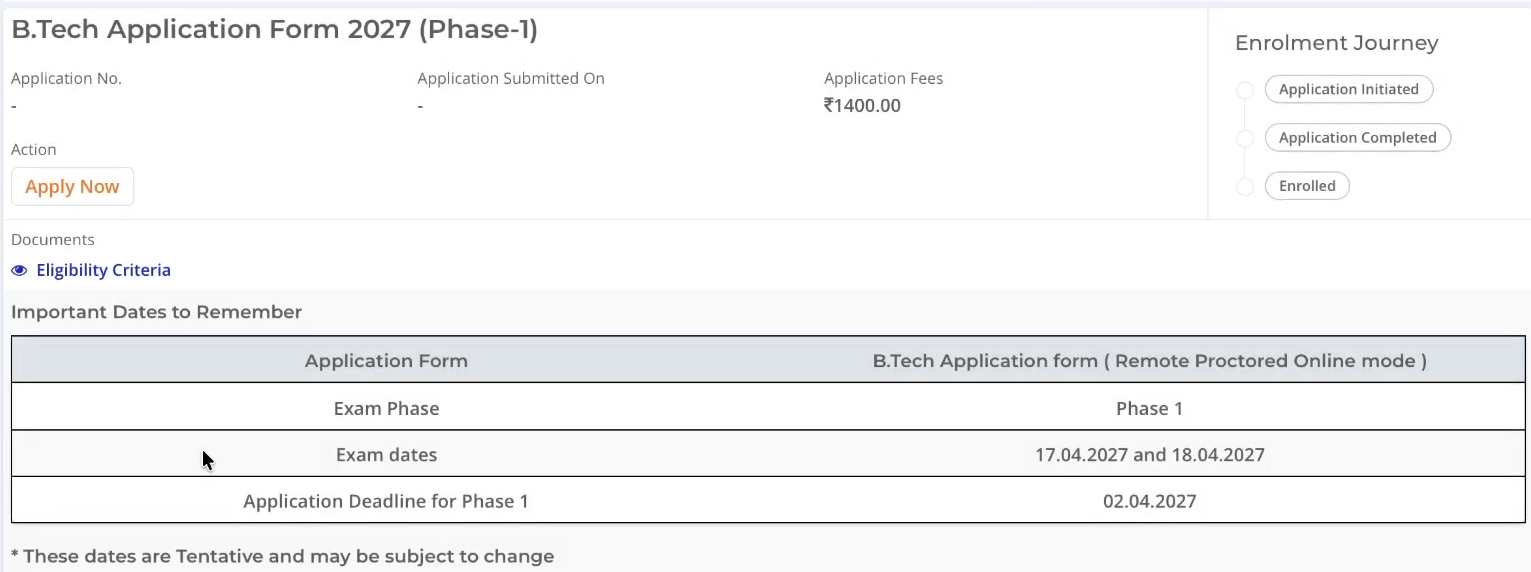
Step 2: Selecting B.Tech Application Form 2027 (Phase-1) on the candidate dashboard.
Step 3: Fill Personal, Parent & Address Details (Stage 1 of 3)
Inside the application form, you start at Stage 1: Personal Details. Keep your ID proof and Class 10 certificate handy so every spelling matches.
- Nationality & Identity: Select your Nationality, confirm whether you studied in India, and enter your 12-digit Student Aadhaar Number (optional but recommended for smooth verification).
- Program & Campus Preferences: Choose your top three Campus Preferences (e.g., Kattankulathur, Ramapuram, Vadapalani, Delhi-NCR, Amaravati). Don't stress too much here—SRM explicitly notes that program and campus choices are tentative and can be modified during counselling.
- Candidate Particulars: Enter your Full Name (strictly as per your qualifying certificate), Mobile Number, WhatsApp Number, Email ID, Date of Birth (DD/MM/YYYY), Gender, and Alternate Email ID.
- Parent/Guardian & Communication Address: Select Parent/Guardian from the dropdown and enter your Father’s Details (Title, Full Name, Mobile Number, and Email ID) along with Mother's details if prompted. Below that, fill in your complete Address for Communication (Country, State, District, City, Address Line 1/Door No., Address Line 2/Street Address, and Pincode). Click NEXT to save and proceed.
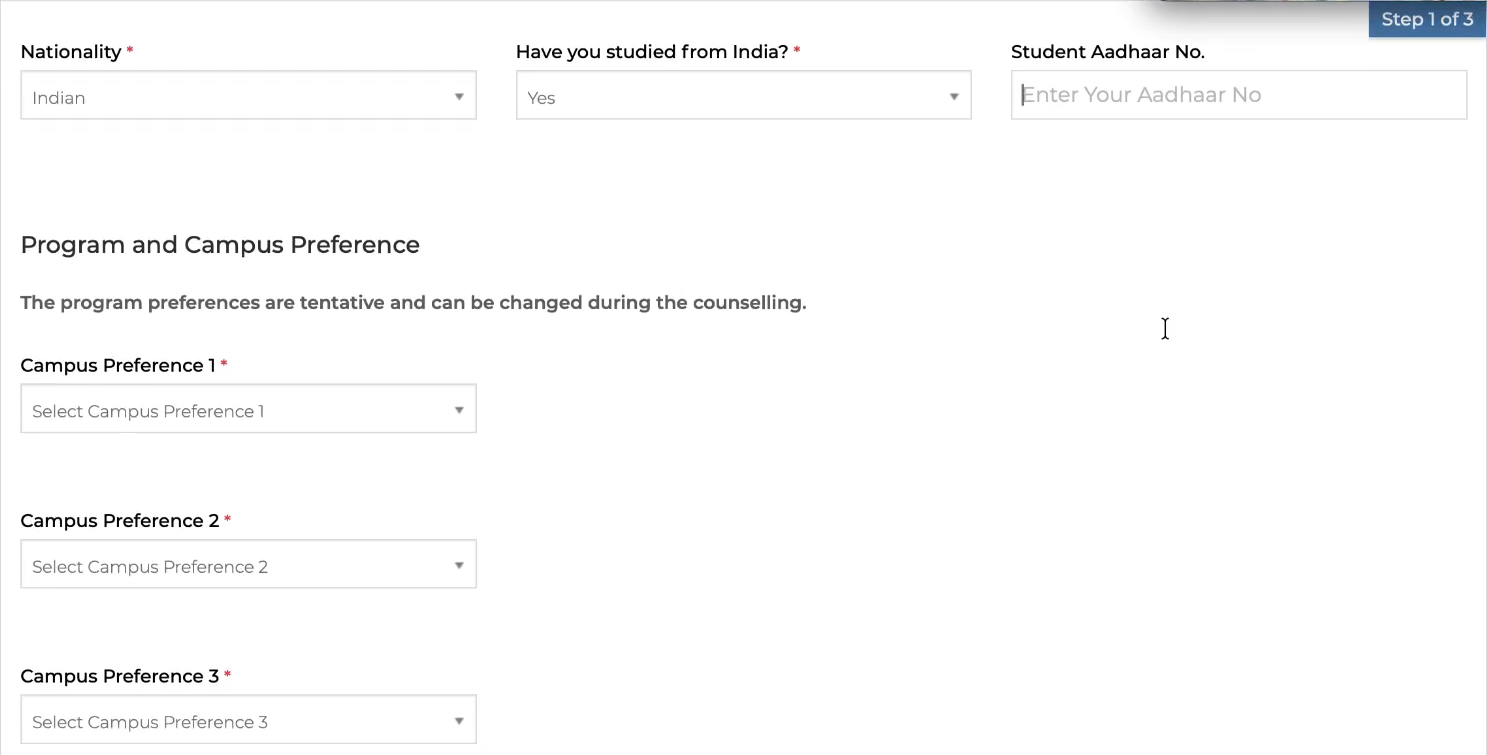
Stage 1: Entering Nationality, Aadhaar details, and top three Campus Preferences.
Step 4: Academic Qualifications & Document Upload (Stage 2 of 3)
At Stage 2: Academic Details (60% completion mark), you enter your schooling history and upload your photograph and signature.
- Qualification Status: Select whether you are currently 12th Appearing (in 2027) or have already 12th Completed.
- Class X, XI & XII Details: Fill in your Institute Name, Education Board (CBSE, ICSE, State Board, IB, NIOS, etc.), Marking Scheme (Percentage or CGPA), Obtained Percentage/CGPA, Year of Passing, Hall Ticket/Registration Number, and Mode of Study (Regular) for Class 10th, Class 11th, and Class 12th. (If you are appearing for Class 12 in 2027, leave the Class 12 obtained marks blank and enter your expected passing year as 2027).
- Photograph & Signature Upload: Upload a recent passport-size photograph (200 × 230 pixels preferred) and a scanned signature (140 × 60 pixels preferred) in JPG, JPEG, or PNG format (maximum 5 MB each). You can also click Fetch From DigiLocker to pull verified documents directly.
- Declaration: Read the declaration carefully, select the "I Agree" radio button, and click Next.
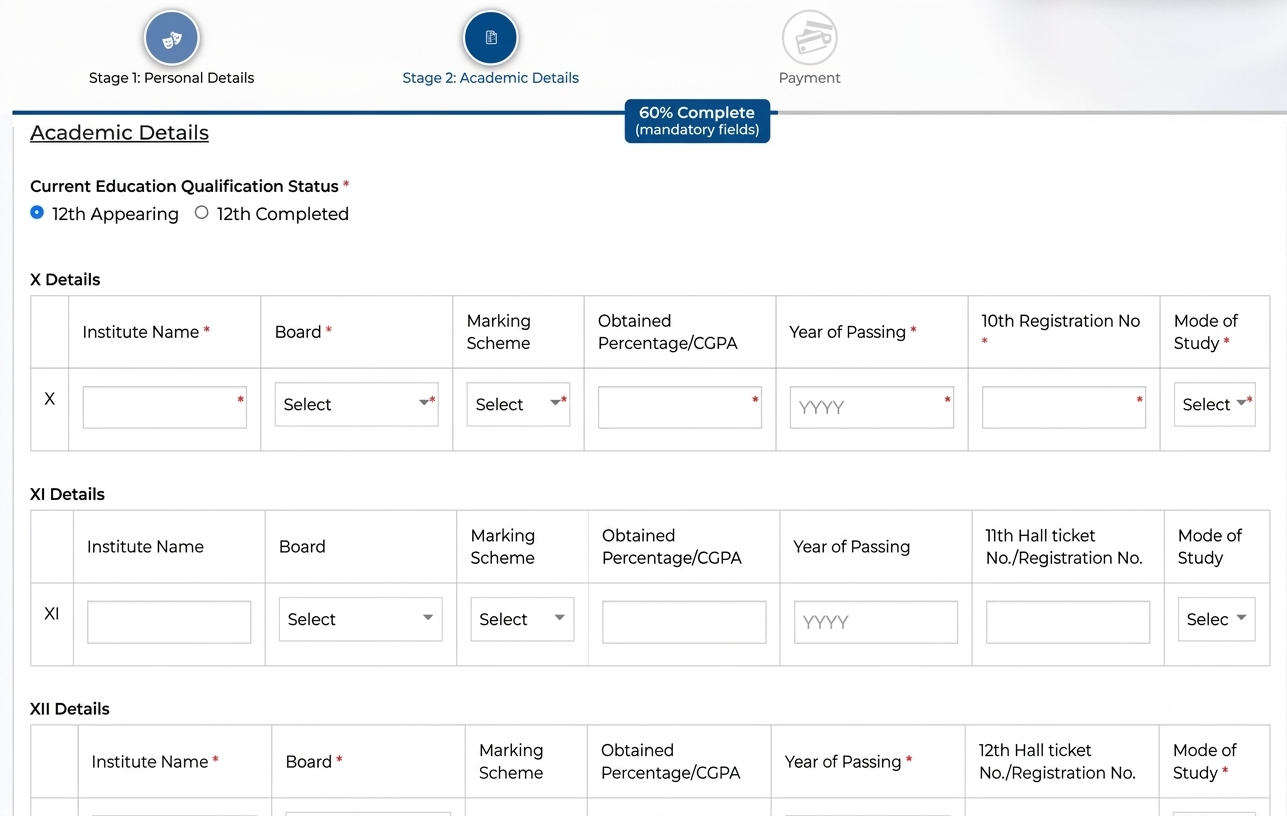
Stage 2: Filling Class X, XI, and XII academic records on the SRMJEEE portal.
Step 5: Final Review & Application Fee Payment (Stage 3 of 3)
Once your academic details and documents are uploaded, the progress bar hits 100% Complete and takes you to Stage 3: Payment.
- Review Payment & Personal Summary: Verify your Name, Email ID, Phone Number, and Order Details (Application Fee: ₹1,400). If you notice any typo, click the < Back button now—because no further changes can be made in the application form once the fee is paid.
- Complete Online Payment: Choose the Online payment option and click the orange Make Payment button. Pay ₹1,400 securely via UPI, Credit/Debit Card, or Net Banking.
- Save Your Confirmation: Once the transaction clears, your unique SRMJEEE Application Number is generated. Download and save the completed application form PDF and payment receipt for slot booking and counselling.
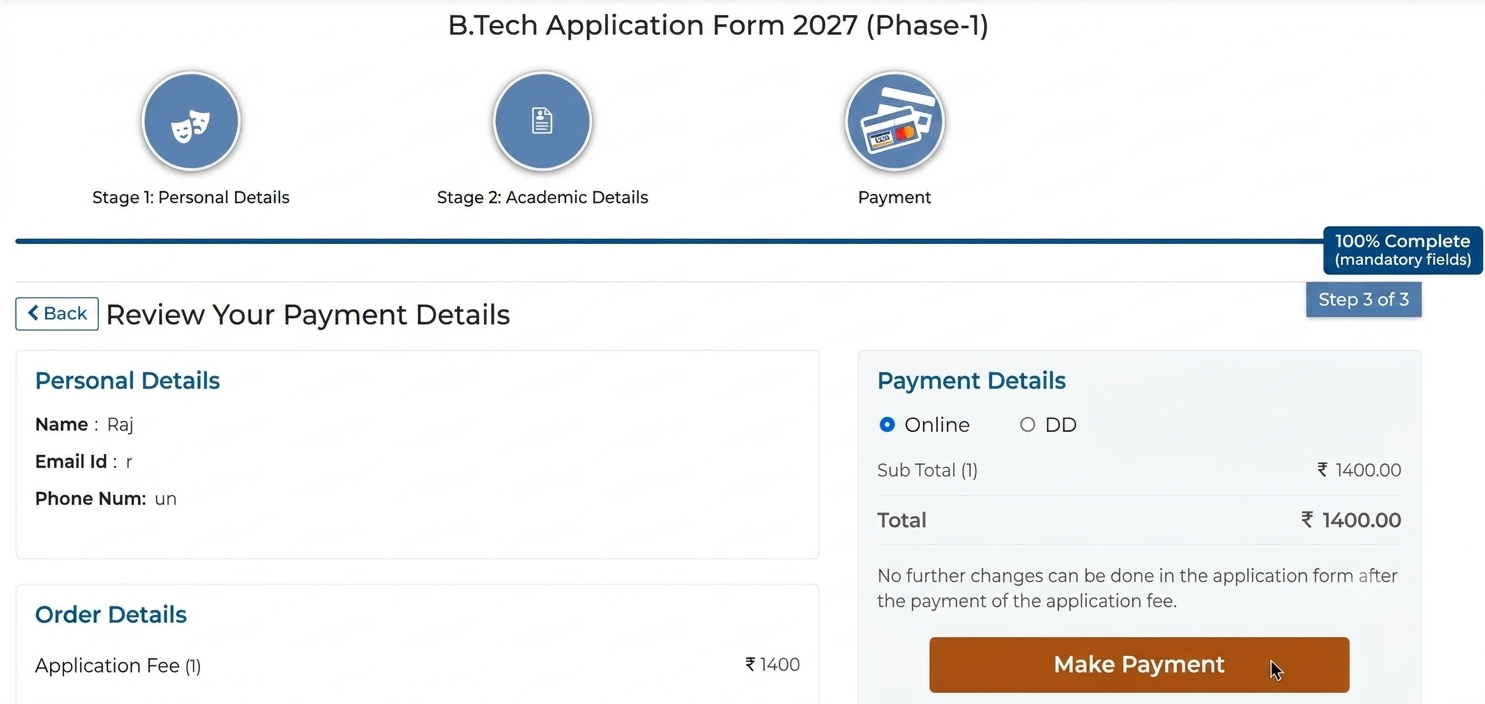
Stage 3: Reviewing payment details and completing the ₹1,400 online fee checkout.
- No Edits After Payment: Unlike some exams that offer long correction windows, SRMIST locks your form immediately after fee payment. Proofread your name, DOB, and board details twice before clicking Make Payment.
- Using Someone Else's Email/Phone: Never use a cyber cafe's or friend's email ID. Because SRMJEEE is conducted in Remote Proctored Online Mode, your exam credentials and mock test links go straight to your registered email.
- Missing the 60% PCM/PMB Rule: Make sure you meet the mandatory 60% aggregate in Physics, Mathematics, and your third major subject before paying the non-refundable ₹1,400 fee.
Conclusion: What Happens After You Submit?
With your SRMJEEE 2027 application submitted and your application number safely tucked away, you’ve cleared the administrative hurdle smoothly. Keep an eye on your email and the SRM admissions dashboard for updates on Slot Booking and mandatory Mock Tests. Since SRMJEEE 2027 runs in Remote Proctored Online Mode, taking the official mock test on the exact laptop or desktop you plan to use on exam day will ensure your webcam, microphone, and internet setup pass without a hitch. Best of luck with your prep!
Frequently Asked Questions (FAQs)
Candidates can apply online exclusively through SRMIST’s official B.Tech admissions portal at applications.srmist.edu.in/btech or via srmist.edu.in.
SRMJEEE 2027 will be conducted in two phases. Phase 1 exams are scheduled for April 17–18, 2027 (application deadline: April 2, 2027), and Phase 2 exams will take place on June 19–20, 2027 (application deadline: June 4, 2027).
The application fee is ₹1,400 per phase (non-refundable) across all categories and genders. If you wish to appear for both Phase 1 and Phase 2, you must pay ₹1,400 separately for each phase (₹2,800 total).
Yes! The three campus and program preferences you enter during Step 1 of the application form are only tentative. You will be able to select and lock your final campus, program, and specialization during online counselling based on your rank.
No. As clearly stated on the Stage 3 payment review screen, once the ₹1,400 application fee is paid, no further edits can be made to the submitted form. Always review every field using the Back button before making payment.
Applicants must have secured (or achieve upon result declaration) a minimum aggregate of 60% marks in Physics (mandatory), Mathematics (mandatory), and at least one major subject such as Chemistry, Computer Science, Biology, Biotechnology, or IT.
Both Phase 1 and Phase 2 of SRMJEEE 2027 are scheduled to be conducted in Remote Proctored Online Mode (RPOM), allowing eligible candidates to take the exam from home using a compatible laptop/desktop with a working webcam and stable internet connection.