How to Fill LPUNEST Application Form 2027: Step-by-Step Registration Process

Applying to Lovely Professional University (LPU) through the Lovely Professional University National Entrance and Scholarship Test (LPUNEST) isn’t just about securing an admission seat—it is also your primary ticket to unlocking substantial tuition fee scholarships. Before you start prepping for mock tests, however, you have to navigate the official application portal cleanly.

Unlike other entrance forms that ask for everything at once, LPU breaks its registration down into a quick sign-up followed by a 4-step online application workflow. To ensure you don’t get tripped up by payment prompts, document sizes, or dropdown menus, here is a verified, human-written walkthrough of the exact registration sequence—plus a handy coupon code to save ₹200 on your application fee.

🎉 Exclusive Student Offer: Save Flat ₹200 on LPUNEST 2027 Fee!

Apply our verified referral/waiver code during Step 1 checkout to get an instant ₹200 discount on your application fee:

LPUJAL394

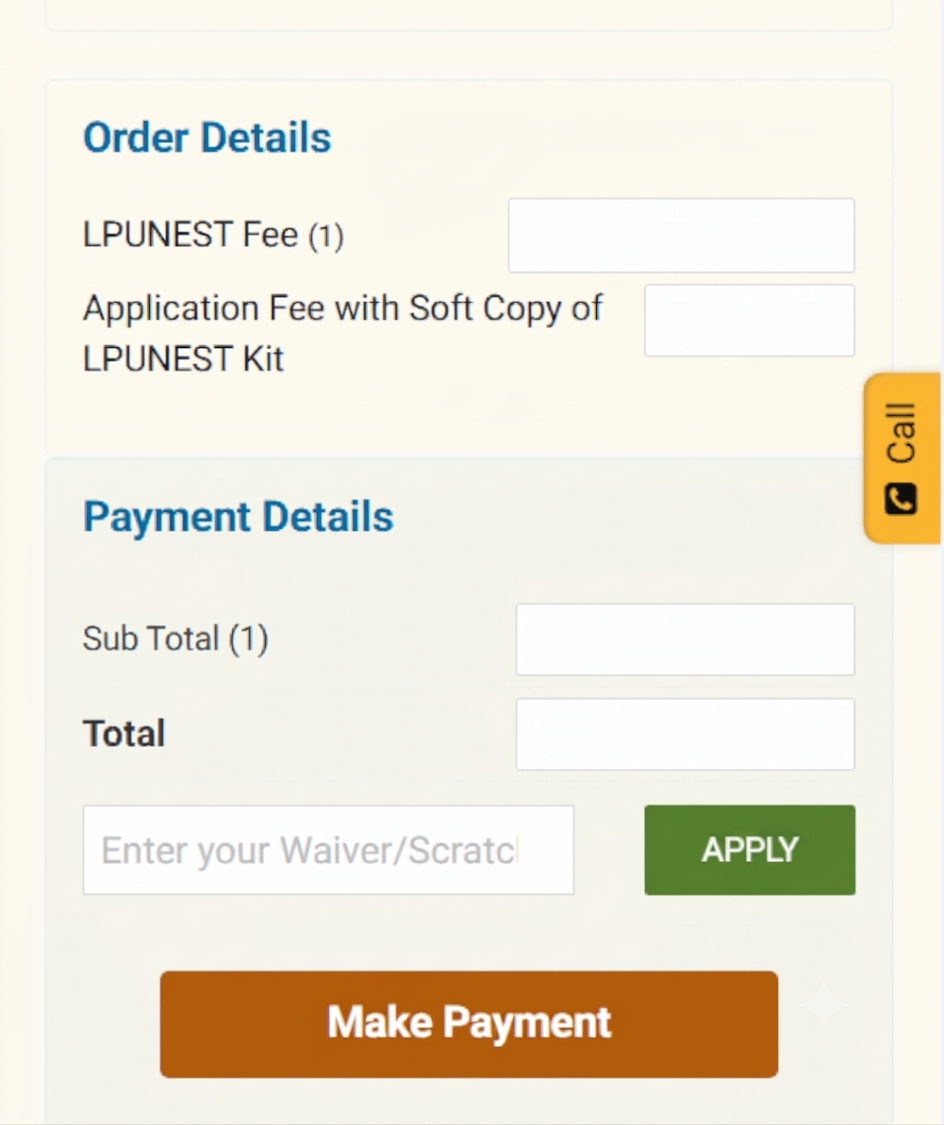
*Enter this code in the "Enter your Waiver/Scratch Code" box before clicking Make Payment.


LPUNEST 2027: Important Dates & Key Highlights

Before diving into the portal, keep track of the official Phase 1 schedule and published fee structure for LPUNEST 2027:

Event / Particular Verified Details (Phase 1)
Online Applications Open 29 September 2026 (Ongoing)
Last Date to Apply & Book Slot 15 January 2027
Slot Booking Window 10 December 2026 – 15 January 2027
LPUNEST 2027 Exam Dates 10 Jan – 05 Feb 2027 (Remote) | 20 Jan – 05 Feb 2027 (Test Centre)
Published Application Fee ₹1,000 (Soft Copy Kit) | ₹1,500 (Printed Kit) — Save ₹200 with code LPUJAL394
Official Registration Portal lpu.in/nest / admission.lpu.in

Initial Registration: Creating Your LPUADMIT Account

Before entering the 4-step dashboard, every candidate must complete a quick sign-up on the LPU admissions landing page to generate their applicant credentials.

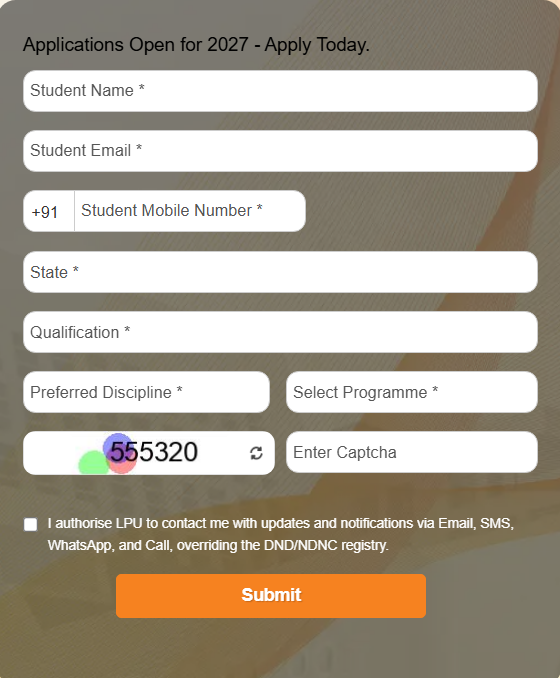
  • Visit the official portal and locate the "Applications Open for 2027 - Apply Today" inquiry box.
  • Enter your full Student Name, active Student Email, and Student Mobile Number (+91).
  • Select your current State, highest Qualification, Preferred Discipline, and target Programme.
  • Enter the security captcha displayed on screen, tick the authorization checkbox for SMS/WhatsApp/Email notifications, and hit Submit.
LPUNEST 2027 Initial Registration Form

Initial Registration: Quick sign-up screen to create your applicant profile.


The 4-Step LPUNEST 2027 Application Process

Once you register and log in to your dashboard, the portal guides you through four distinct stages (labeled Step 1 of 4 through Step 4 of 4). Notice that LPU collects your application fee right at the end of Step 1 before unlocking the academic and exam preference modules.

Step 1 (of 4): Review Details, Order Summary & Fee Payment

The very first stage inside your dashboard confirms your primary identity and settles the application kit payment.

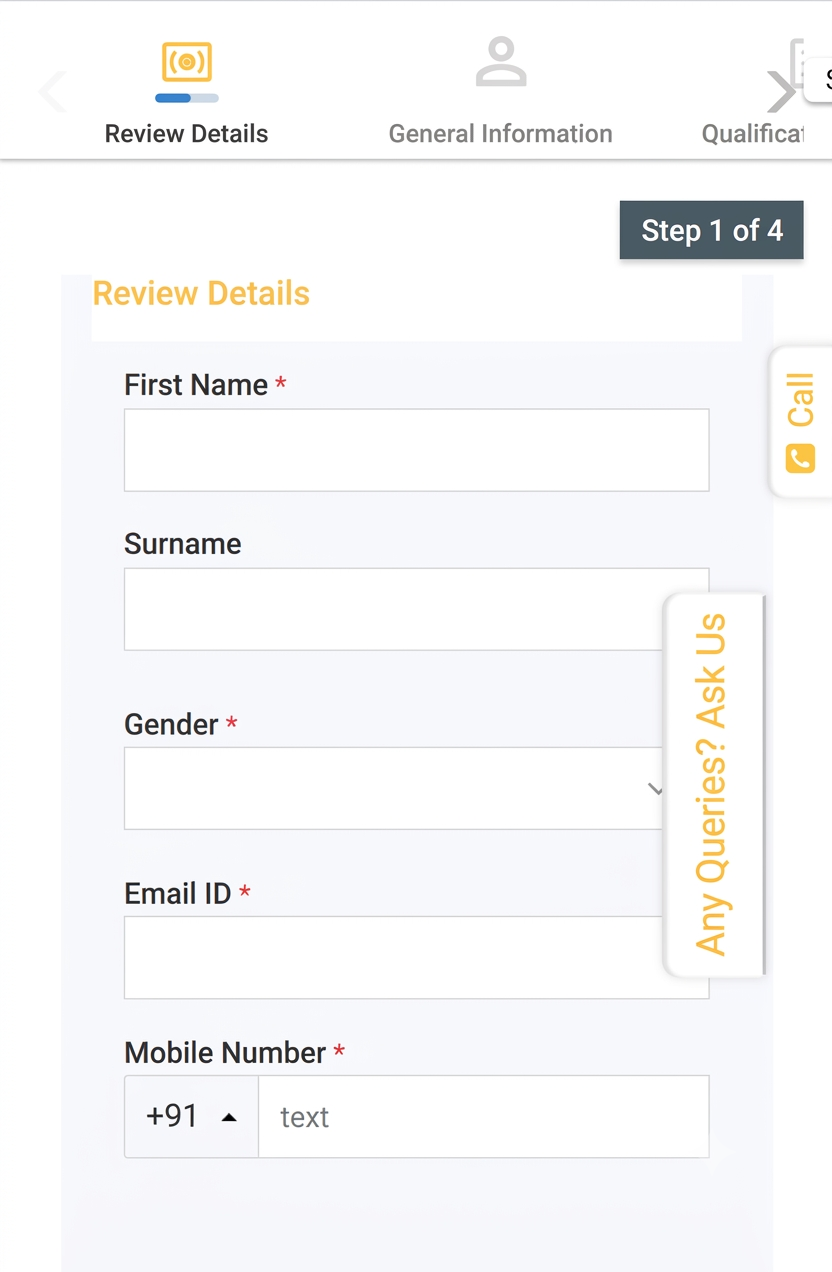
  • Review Personal Details: Double-check your First Name, Surname, Gender, Email ID, and Mobile Number to make sure they match your Class 10 certificate.
  • LPUNEST Kit Prompt: On the payment review screen, select whether you already hold a physical LPUNEST Kit / Prospectus Scratch Code (select No if you are applying directly online).
  • Apply Coupon Code & Pay: In the Order Details summary, enter the waiver/coupon code LPUJAL394 in the "Enter your Waiver/Scratch Code" field and click APPLY to get a flat ₹200 discount on your fee!
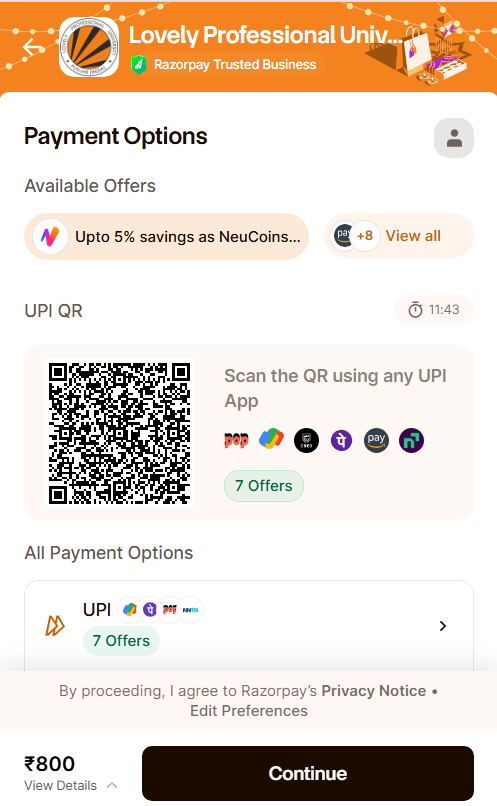
  • Click Make Payment and complete the checkout smoothly via Razorpay using UPI QR scan, Google Pay, PhonePe, Net Banking, or Cards.
LPUNEST Step 1 of 4 Review Details

Step 1 (Part A): Reviewing basic personal and contact fields.
LPUNEST Order Details and Coupon Code LPUJAL394 Box

Step 1 (Part C): Enter coupon code LPUJAL394 here for a flat ₹200 discount before clicking Make Payment.

LPUNEST Razorpay Payment Gateway

Step 1 (Part D): Discounted fee checkout via Razorpay UPI/Card/NetBanking gateway.

Step 2 (of 4): General Information & Contact Details

Once your payment goes through, the portal unlocks Step 2, where you fill in your demographic background, family info, and communication address.

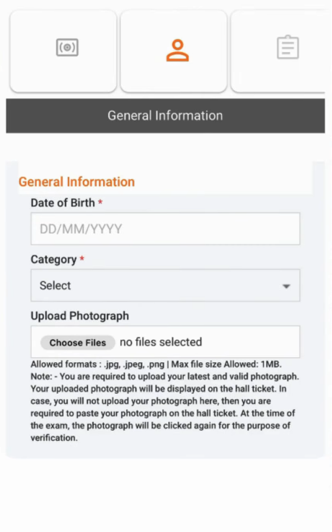
  • General Information: Enter your Date of Birth (DD/MM/YYYY) and select your social Category from the dropdown menu.
  • Upload Photograph: Upload a clear, recent passport-size photograph (.jpg, .jpeg, or .png up to 1 MB). This exact photo will appear on your hall ticket and be verified on exam day.
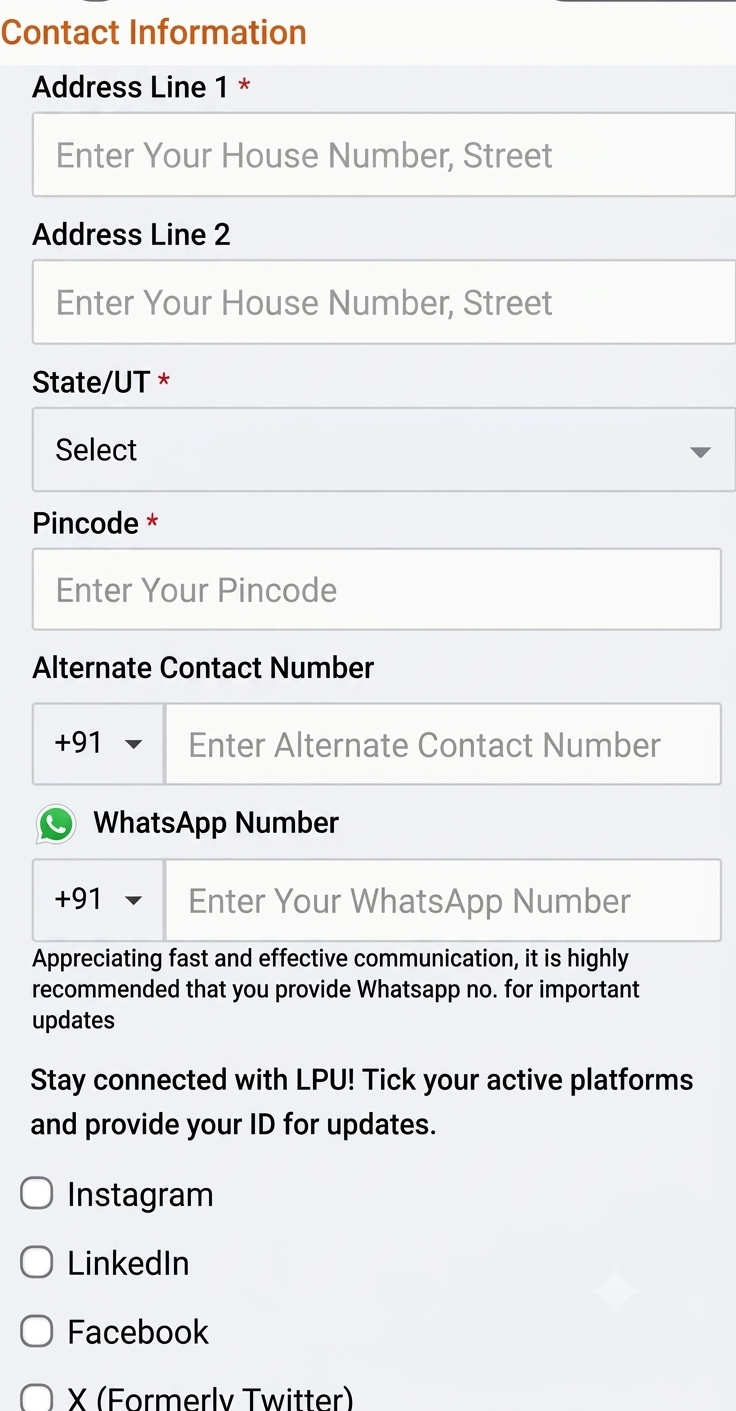
  • Contact & Family Details: Fill in Address Line 1, Address Line 2, State/UT, and Pincode. Provide an alternate contact number and your active WhatsApp number for instant university alerts. In this same section, accurately enter your Father's and Mother's details (names, contact numbers, and occupation) as required by the portal.
LPUNEST Step 2 General Information and Photo Upload

Step 2 (Part A): Entering DOB, Category, and uploading your passport-size photograph.

LPUNEST Step 2 Contact Information and Address

Step 2 (Part B): Filling in residential address, WhatsApp number, and family/guardian details.

Step 3 (of 4): Qualification Details (Class 10th & 12th)

Step 3 covers your academic track record, which LPU uses to verify your programme eligibility and calculate merit-based scholarships.

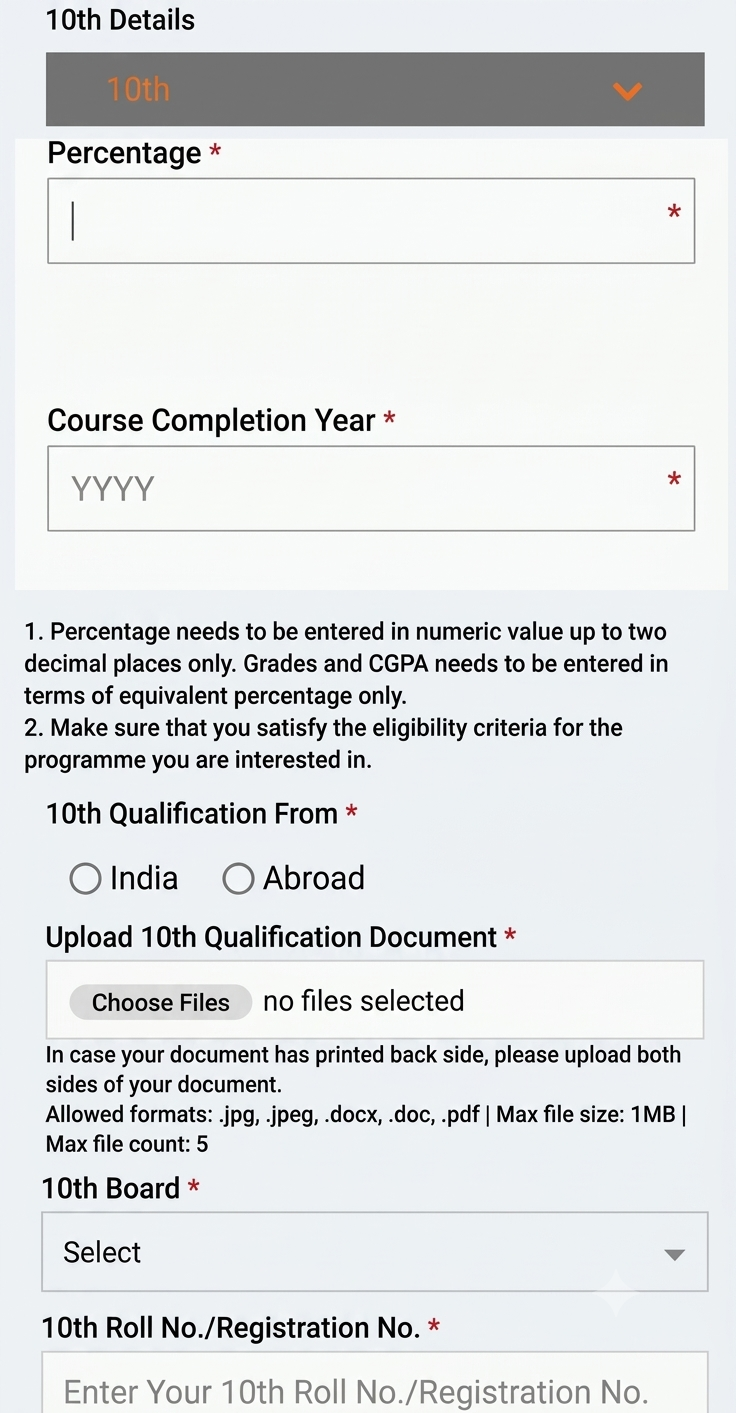
  • Class 10th Details: Enter your aggregate percentage up to two decimal places (convert CGPA into equivalent percentage as per your board's formula), course completion year, and qualification country (India/Abroad). Select your 10th Board, type your Roll/Registration Number, and upload a scanned copy of your marksheet (.jpg, .jpeg, .pdf, .doc/.docx under 1 MB).
  • Class 12th Details: Right below your 10th details, fill in your Class 12th (or Diploma) qualification status (Appearing/Passed), stream/subjects, board name, roll number, and percentage. If you have already passed Class 12th, upload your marksheet scan; if you are currently appearing in 2027, select the appearing option and upload it once results are declared.

Step 3: Entering Class 10th and 12th percentages, board info, and uploading academic documents.

Step 4 (of 4): Exam Information & Final Submission

You have reached the final step (Step 4 of 4)! Here, you simply choose how and where you want to take your test.

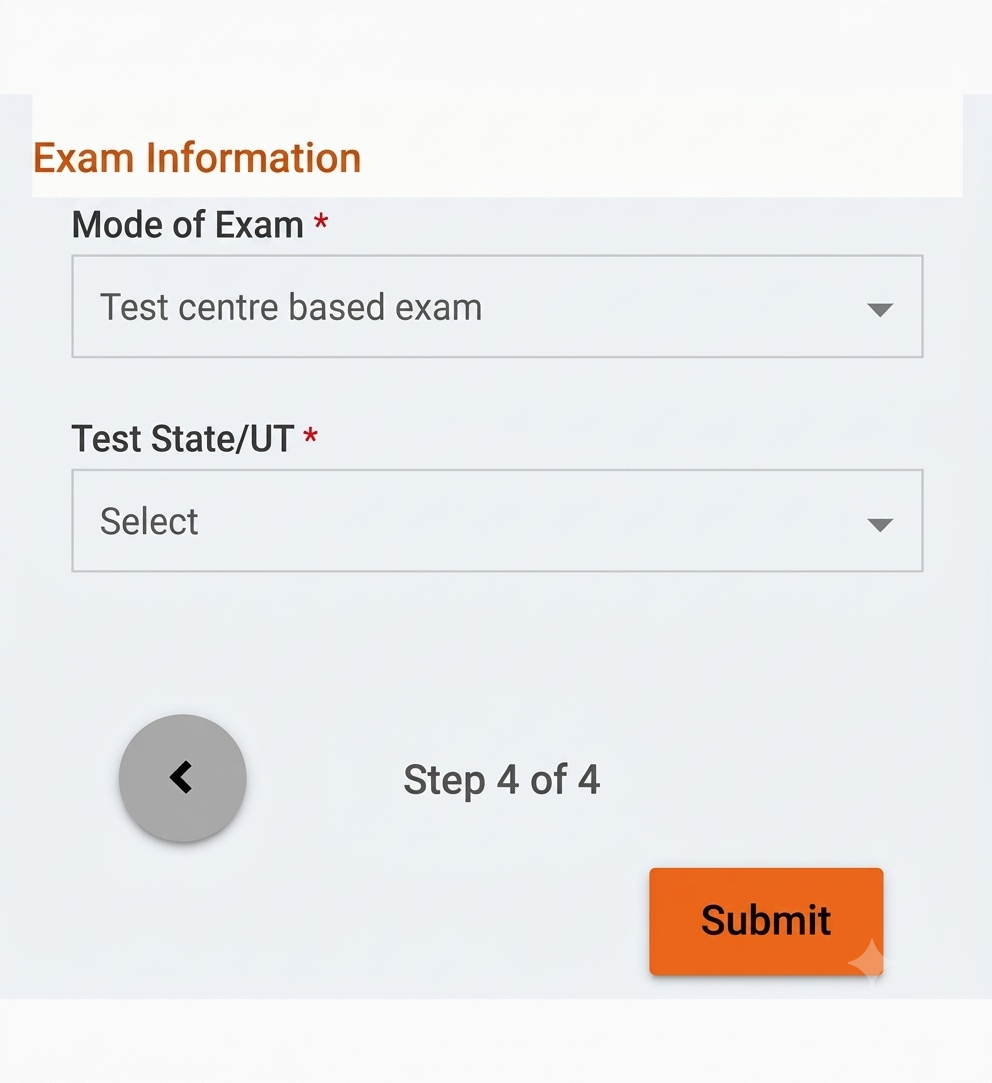
  • Mode of Exam: Choose between a Test Centre Based Exam (at an authorized exam center) or a Remotely Proctored Online Exam from home (depending on your selected programme's availability).
  • Test State/UT: Select your preferred Test State/UT from the dropdown menu.
  • Double-check all entries and click the orange Submit button. Congratulations—your LPUNEST 2027 application form is officially submitted!
LPUNEST Step 4 Exam Information and Submit

Step 4: Selecting Mode of Exam, Test State/UT, and clicking Submit to complete registration.

⚠️ Quick Reminders Before You Hit Submit:
  • Don't Forget the Discount: Make sure you apply code LPUJAL394 in Step 1 before making your payment to claim your flat ₹200 waiver.
  • CGPA Conversion: Always enter your Class 10th/12th scores in percentage format up to two decimal places, not raw CGPA.
  • Save Your Confirmation: Download a PDF copy of your submitted application form and payment receipt for slot booking and counselling.

Conclusion: What to Do After Submitting Your LPUNEST Form?

Getting your LPUNEST 2027 application submitted cleanly in four structured steps puts you well ahead of the crowd. Once your form is locked in, keep an eye on your registered email and WhatsApp for the Online Slot Booking (OSB) window (opening December 10, 2026 for Phase 1). Booking your slot early ensures you get your preferred exam date, time, and test center without last-minute compromises. Until then, focus on reviewing your syllabus, practicing sample papers, and aiming for a top scholarship bracket!


Frequently Asked Questions (FAQs)

Q1: How many steps are there in the LPUNEST 2027 application form?

After completing a quick initial sign-up, the main online LPUNEST application form consists of 4 steps: (1) Review Details & Fee Payment, (2) General & Contact Information, (3) Qualification Details (10th & 12th), and (4) Exam Information & Submission.

Q2: How can I get a discount on the LPUNEST 2027 application fee?

During Step 1 (Payment Details), enter the coupon/waiver code LPUJAL394 in the "Enter your Waiver/Scratch Code" box and click Apply to receive an instant flat ₹200 discount on your application fee.

Q3: What is the application fee for LPUNEST 2027?

The standard published fee is ₹1,000 for the Soft Copy LPUNEST Kit and ₹1,500 for the Printed LPUNEST Kit (applicable to both boys and girls). Applying coupon code LPUJAL394 reduces this fee by ₹200.

Q4: Can I apply for LPUNEST 2027 if I am currently appearing in Class 12th?

Yes! Students appearing for their Class 12th board exams in 2027 can select the "Appearing" status under Step 3 (Qualification Details) and submit their final marksheet later once results are declared.

Q5: Can I take the LPUNEST 2027 exam from home?

Yes, for eligible programmes, LPU offers a Remotely Proctored Online Exam option from home alongside the traditional Test Centre Based Exam option in Step 4.

Q6: What document formats and sizes are accepted on the LPUNEST portal?

Your passport-size photograph must be in .jpg, .jpeg, or .png format under 1 MB. Class 10th and 12th qualification documents accept .jpg, .jpeg, .pdf, .doc, or .docx files up to 1 MB per file.

Q7: When does LPUNEST 2027 Phase 1 slot booking start?

For Phase 1 applicants, online slot booking opens on 10 December 2026 and remains open until 15 January 2027 on a first-come, first-served basis.